Amazon Connect Customer adds automated checks for AI-scored evaluation forms
If your organisation runs a contact centre on Amazon Connect and uses AI to automatically score agent performance evaluations, this one-click check lets a manager catch vague evaluation questions while setting up the form -- for example the check might flag "Did the agent provide a sales disclosure?" so you can specify exactly what must be disclosed before a sale, which helps score both human and AI agents fairly and accurately. It is available in Sydney, among other regions.
What changed
Source summary
Amazon Connect Customer now runs a one-click automated check, while a manager is setting up a performance evaluation form, that compares the form against best practices. The check flags questions that lack the context AI needs to score reliably -- for example, the vague question "Did the agent provide a sales disclosure?" -- and suggests making them more specific, such as naming exactly what must be disclosed before a sale, so human and AI agents are scored fairly and accurately. Available in US East (N. Virginia), US West (Oregon), Canada (Central), Europe (Frankfurt), Europe (London), and Asia Pacific (Singapore, Sydney, Tokyo).
Why it matters to your work
Practical interpretation
If your organisation runs a contact centre on Amazon Connect and uses AI to automatically score agent performance evaluations, this one-click check lets a manager catch vague evaluation questions while setting up the form -- for example the check might flag "Did the agent provide a sales disclosure?" so you can specify exactly what must be disclosed before a sale, which helps score both human and AI agents fairly and accurately. It is available in Sydney, among other regions.
When this could help
Useful while you are creating or editing a performance evaluation form in Amazon Connect Customer that has at least one generative-AI-automated question, before you activate the form -- the help documentation sequences this validation step immediately before activation.
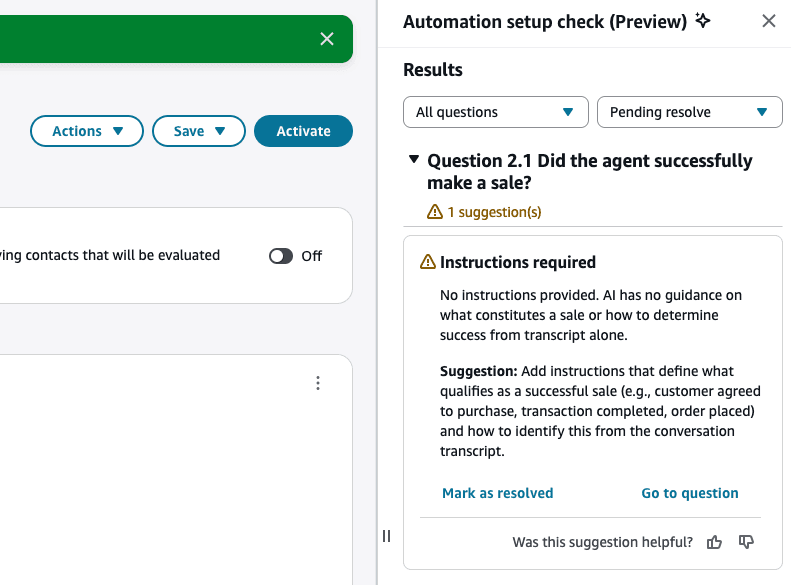
Amazon Connect Customer can run a one-click automated check, while you're setting up a performance evaluation form, that compares the form against best practices. It flags questions that lack the context AI needs to score reliably -- for example a vague question about whether an agent gave a sales disclosure -- and suggests making them more specific, which helps automatically score human and AI agents fairly and accurately. Save and validate first runs structural checks. Its second stage checks best practices only when there are no structural Errors and the form contains Gen AI-automated questions.
How to get started
Confirm your user account has the security profile permission to manage evaluation form definitions (Analytics and Optimization > Evaluation forms - manage form definitions > Create), then open Analytics and optimization > Evaluation forms in the Connect Customer admin website.
Provider guidance ↗While building or editing an evaluation form that includes at least one question answered using generative AI, choose Save, then Save and validate to run the automated best-practices check with a single click.
Provider guidance ↗Review each flagged question in the results side panel -- the announcement's own example is a vague "Did the agent provide a sales disclosure?" question -- and rewrite it to name the exact disclosure or detail the AI should check for, as the check suggests.
Provider guidance ↗Marking a finding resolved only hides it; it does not rerun validation or change activation state. Validate again after corrections. After a new version is activated, evaluators cannot start new evaluations with the previous version; completed evaluations from earlier versions remain viewable.
Provider guidance ↗
Build it into your routine
SCALA suggested workflow
Before activating a new or edited evaluation form that has generative-AI-automated questions
Run Save and validate, tighten any flagged question by naming the exact disclosure or detail the AI should check for, then validate again before activating the form.
What to check
- The check flags vague questions but doesn't define the correct answer for you -- in the announcement's example it only prompts you to name the exact disclosure a question should check for ('Did the agent provide a sales disclosure?'), so you still need to know your own policy or compliance requirement. Source ↗
- Per Amazon Connect's help documentation, the best-practices check (the form's second validation stage) only runs for forms that contain generative-AI-automated questions, and only after the form's structural validation (section/question limits, scoring and weight consistency, unique identifiers) passes with no errors. Source ↗
- The help documentation states generative-AI validation is rate-limited per Connect Customer instance: no more than 3 validations can run in parallel and no more than 30 per hour; exceeding either limit returns an error and you must try again later. Source ↗
- The announcement does not state pricing for this capability; it only directs readers to the Amazon Connect Customer pricing page. Source ↗
- The announcement says the check 'might flag' a question like its stated example, so the exact wording and number of flagged results will vary by form -- it is an illustrative example, not a guaranteed match. Source ↗
- Structural Errors block activation and must be resolved. Best-practice Warnings do not block activation. Source ↗
Sources & provider guides
Official documentation checked 14 Oct 2026. SCALA prompts and workflows are suggestions, not claims of hands-on testing.
Source & availability
This is a summary of a published provider announcement, with practical context from SCALA’s feed.
Plan, region, workspace and rollout conditions may affect access in Australia. Check the original source for current availability.
aws.amazon.com