
Federated Copilot Connectors
This is mainly relevant if your organisation's IT team manages Microsoft 365 Copilot. It lets Copilot pull live data from third-party systems without Microsoft storing a copy, which can ease data-governance and compliance concerns for regulated or security-conscious businesses. It is not something an end user sets up themselves.
What changed
Source summary
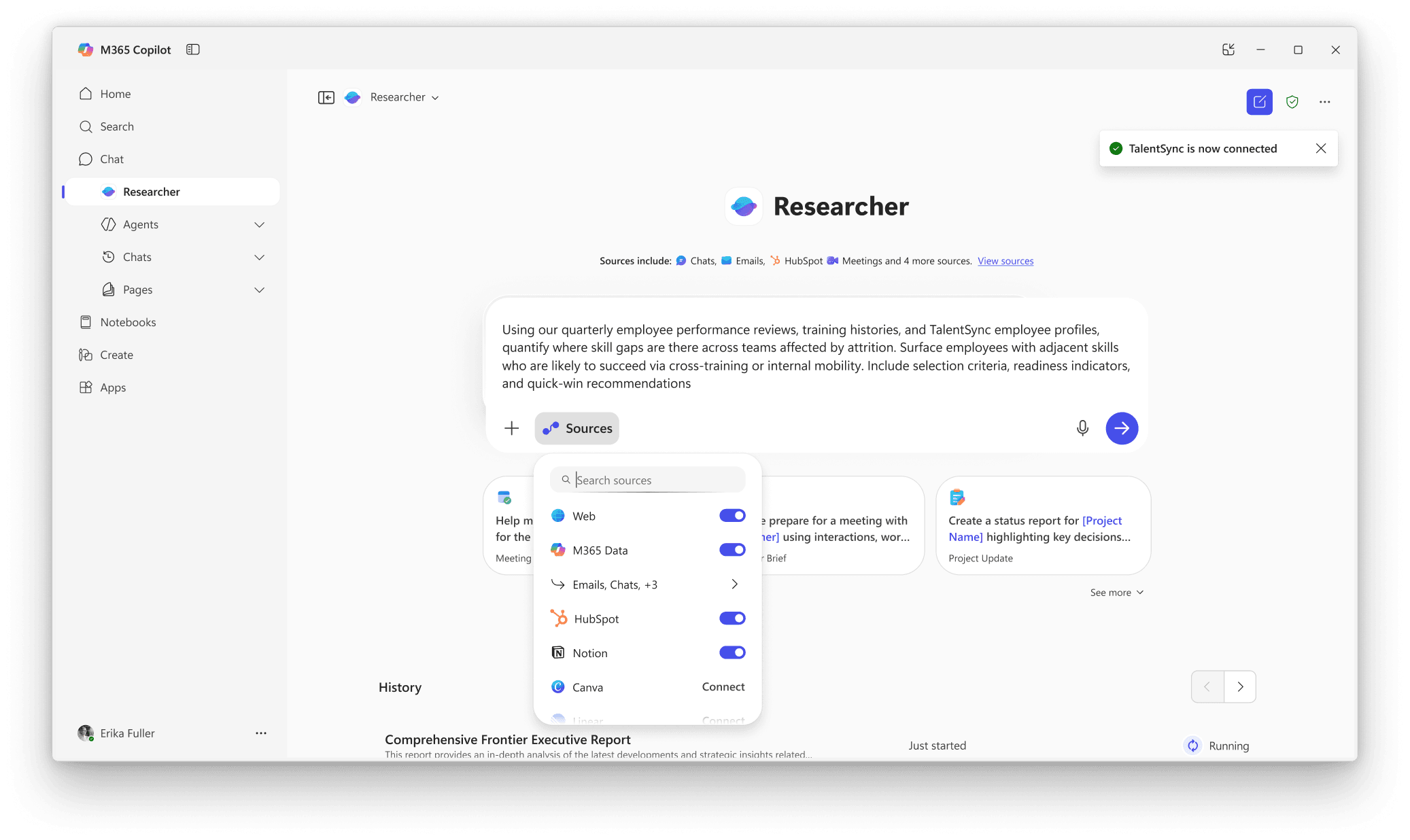
Microsoft announced general availability of federated Copilot connectors, which let Microsoft 365 Copilot securely connect to third-party data sources in real time using the Model Context Protocol (MCP) without storing or indexing that data in Microsoft's own services. Access happens using the end user's own identity, admins retain governance controls through the Microsoft 365 admin center, and the connectors are supported in Researcher, Microsoft 365 Chat, and Copilot in Excel.
Why it matters to your work
Practical interpretation
This is mainly relevant if your organisation's IT team manages Microsoft 365 Copilot. It lets Copilot pull live data from third-party systems without Microsoft storing a copy, which can ease data-governance and compliance concerns for regulated or security-conscious businesses. It is not something an end user sets up themselves.
When this could help
When a team needs Copilot (in Chat, Researcher, Cowork, or Word/Excel/PowerPoint/Outlook) to pull from a CRM, project tool, or document source outside Microsoft 365, and an admin has enabled that connector for the tenant.
Copilot fetches real-time data from the connected app using the user's own identity and permissions, without Microsoft storing or indexing that data, so answers reflect what's actually in the third-party system right now.
How to get started
Admin: in the Microsoft 365 admin center, go to Copilot connectors > Your connections to enable the relevant federated connector for the tenant (or limit it to specific Entra ID groups via Staged Rollout).
Provider guidance ↗User: open Microsoft 365 Copilot Chat, select the ... menu, then Settings.
Provider guidance ↗Select Sources in the settings dialog, find the data source, select Connect, and complete authentication with your own credentials.
Provider guidance ↗Enter your prompt directly in Copilot Chat (or in Researcher's Sources panel); responses are fetched dynamically via MCP, not indexed into Microsoft 365.
Provider guidance ↗
Try this · The SCALA method
Give AI a clearer brief
- Situation
- Your team needs an answer that depends on data living outside Microsoft 365, e.g. a CRM or project tool.
- Consultant
- You are helping a Microsoft 365 Copilot user get a grounded answer from a connected third-party source rather than a guess.
- Action
- Connect the relevant federated connector in Copilot Chat Sources, then ask Copilot a specific question that requires that live data.
- Language
- Plain, specific business language naming the system and the exact data needed (e.g. 'using our HubSpot pipeline, list deals stalled over 30 days').
- Ask
- Request the answer with a short rationale of which source fields it drew from, so you can sanity-check the result against the source system.
SCALA suggested prompt · Adapt the context and check the result.
Learn the SCALA method →Build it into your routine
SCALA suggested workflow
Weekly CRM check-in
Ask Copilot in chat to summarise stalled or at-risk deals directly from the connected CRM, without opening the CRM itself.
Turning an email into a tracked item
Once write actions are available, ask Copilot to turn an escalation email into an issue in a connected project-tracking tool, approving the write action when prompted.
What to check
- No data is indexed into Microsoft 365, so access depends on the third-party source being reachable; access and permissions are governed by the user's own account in that source system. Source ↗
- The Researcher agent stays read-only even after write/update/delete actions roll out elsewhere. Source ↗
- Write, update and delete tools require explicit user approval the first time, and the available actions depend on what the connector publisher has exposed. Source ↗
Sources & provider guides
Official documentation checked 12 Oct 2026. SCALA prompts and workflows are suggestions, not claims of hands-on testing.
Source & availability
This is a summary of a published provider announcement, with practical context from SCALA’s feed.
Plan, region, workspace and rollout conditions may affect access in Australia. Check the original source for current availability.
learn.microsoft.comThis update is primarily for technical teams.